A test fails during an interview. You can read the error, but explaining the next step is harder. Start with what the test actually observed.
This guide uses a real run of an invented order API. It is not a candidate assessment or a company incident. You can run the same example on your computer.
Name the check that failed
The test is called order total includes both items. An assertion is a check that fails when a result is wrong. This assertion compares the order total with the required amount.
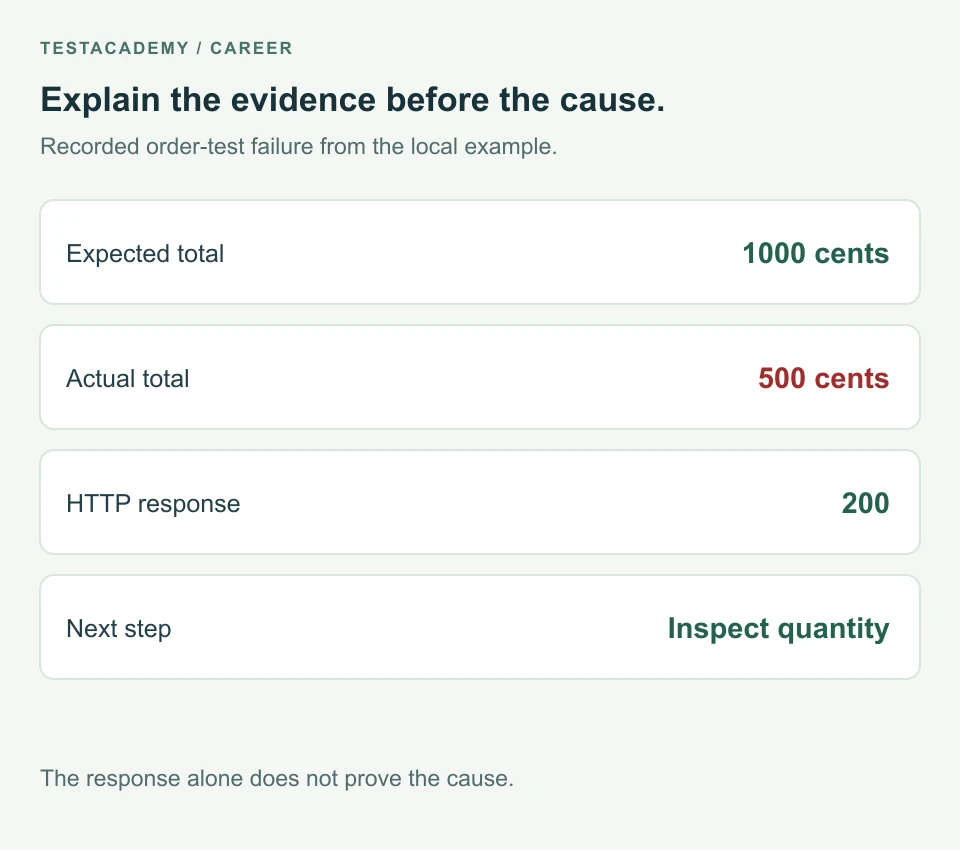
The order contains two items at 500 cents each. There are no taxes or delivery fees in this example. The required total is 1000 cents.
The failure output says:
The total must include both items.

500 !== 1000
The required amount is the expected result. The returned amount is the actual result. Explain those values before proposing a fix.
Separate the request result from the data result
The request completed with HTTP 200. An HTTP status code describes the request result. The response body is the returned data.
Here is the response from the failing run:
{
  "id": "example-order",
  "quantity": 2,
  "unitPriceCents": 500,
  "totalCents": 500
}
The API responded successfully, but the total did not match the requirement. Increasing a timeout does not correct that amount. A timeout is the time a test allows an operation to finish.
State a possible cause without presenting it as a fact
The returned total matches the price of one item. The calculation might be ignoring quantity. That is a possible cause, not proof from the response alone.
Check the requirement and the test data. Then inspect the calculation or the code that builds the response. A wrong test expectation can also cause an assertion failure.
If the request had not completed, the investigation would be different. Check the address, app startup and network error first. For 401 or 403 responses, use the API access guide.
Give a clear explanation
An explanation for this run could be:
The order-total assertion failed. The test expected 1000 cents. The API returned 500 cents. The request completed with HTTP 200. The amount matches the price of one item. The next step is to inspect how the total uses quantity. The response alone does not show where the calculation went wrong.
This explanation names the failed check and the observed values. It gives a next step without claiming the cause is already confirmed.
Do not change the expected amount just to make the test pass. Confirm the requirement first. If the requirement changed, update the test and explain that change.
Confirm what the corrected behaviour should do
The same total assertion passes on the working API. It fails on the version that ignores quantity. That comparison shows what this check detects.
It does not show whether payment, delivery or saving an order works. Those behaviours need their own evidence.
For the full testing lesson, read why an API can return 200 with wrong data.
Run the example before practising your explanation
Use Node.js 22 or newer. Node.js runs JavaScript outside a browser. Download the existing order example and extract it.
Open a terminal in that folder and start the broken version:
node server.mjs --broken
Keep that terminal open. In another terminal in the same folder, run:
node --test total.test.mjs
The total check fails. Read its name, expected amount and actual amount. Then explain the next check you would make. Stop the server with Ctrl+C when finished.
The test uses Node's built-in runner. No extra packages are needed. It runs locally, outside the TestAcademy browser editor.
Keep evidence and plans separate
If you have not inspected the app code, say that. If you cannot repeat the failure, explain what you would record next. Do not describe a proposed fix as a completed fix.
Download the failure explanation worksheet to prepare your own example. Fill it with results you actually observed.
For presenting the rest of your project, see the QA automation portfolio guide.
Remember this
Explain the failed check, the observed result and the next investigation step. Keep a possible cause separate from a confirmed cause.
References: Node.js assertions and Node.js test runner.