Your tests pass. Your README lists the tools you used. A reader still cannot tell what you tested or why.
A useful QA automation portfolio explains those decisions. QA means quality assurance. A portfolio is a collection of work that someone can inspect. Your project should let a reader run the tests and understand the results.
If you are still choosing what to learn, start with the QA automation roadmap. This guide focuses on presenting a project you are building.
Choose an app you can control
Use a small app you own, or have permission to test. A local example is easier to keep consistent. You control its data and can repeat a failure.
Choose a behaviour you can explain in plain words. For example, an order total must include the quantity ordered. Write the expected result before choosing the assertion. An assertion is a check that fails when a result is wrong.
If you use a tutorial project, credit the source. Explain what you changed and which tests you wrote yourself.
Connect each test to a requirement
A requirement states how the app should behave. A test needs a result that proves that behaviour.
For an order total, a successful response is not enough. The amount also needs to match the order. Our API response example shows this difference with runnable files.
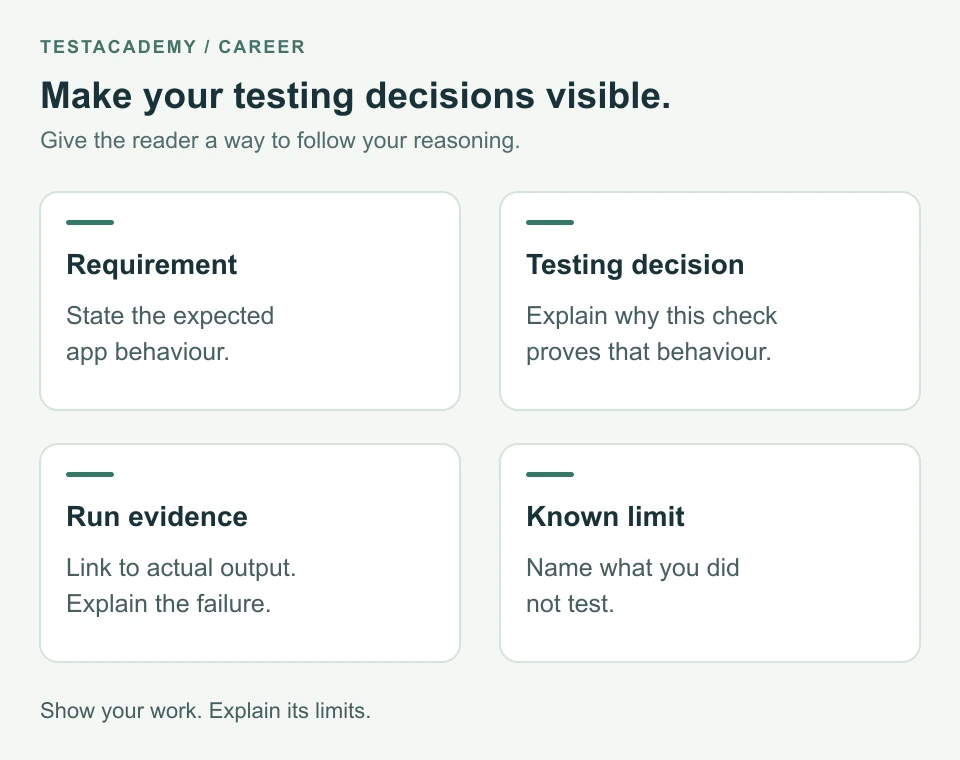
In your project notes, explain the choice. Name the value you check and why it matters. Say which wrong behaviour would make the test fail.
For a browser test, explain how you find the element. A locator describes which element the test should use. Explain why it identifies the intended control. Describe how the test waits for the expected result.
Write a README someone can follow
A README is the introduction file shown on your project page. GitHub recommends explaining the project and how to get started. See its README guidance.
Put the main information near the beginning. Use short sections like these:
| Section | What to explain |
|---|---|
| Project purpose | The app behaviour you are testing and why it matters. |
| Setup | Required software, app startup and the exact test command. |
| Test choices | The requirements checked and the reasons for your assertions. |
| Results | Where to find output from a real run. |
| Limits | What you have not tested and what you would check next. |
Use commands that work in a fresh copy of your project. State the software versions you actually used. If the app needs to start first, say so. Explain how to create the test data and remove it afterward.
Here is how the order API example could be described. These sentences describe the runs shown in that guide:
Purpose: Check that the order total includes the quantity ordered.
Testing decision: Check the total because HTTP 200 does not check the amount.
Evidence: The total check passes on the working API. It fails when the calculation ignores quantity.
Limit: This example does not test payment or saving an order.
Use this structure, then write the facts from your own project.
A missing setup step makes a correct test hard to review. Ask someone to follow the README without your help. Update the instructions when they find a missing step.
Show a failure your test detects
A passing run shows that the checks passed. It does not show which bugs those checks would catch.
In an app you control, deliberately break the behaviour your test checks. Run the same test again. Confirm it fails because of that change. Restore the app and confirm the test passes.
Keep the test name, expected result and actual result together. Explain what changed in the app. A syntax error or unavailable server does not demonstrate the intended behaviour check.
Our guide A test can pass and still miss a bug explains this with a button.
Use output from your own run. Do not invent pass counts or copy a result from another project. If you share a screenshot, include the test name and assertion failure.
In Playwright, a trace records actions and page states from a test run. It can help you investigate why a browser test failed. The Playwright Trace Viewer guide explains how to record and inspect one.
Make the run repeatable
Each test should prepare the state it needs. It should not depend on another test running first. For more on this, read how to fix flaky tests. A flaky test passes sometimes and fails sometimes without an intended change.
Once the project works locally, add automatic checks if they help your project. CI means continuous integration. It runs checks when you change code. Our guide to running tests in CI explains the setup.
If you use GitHub Actions, link to an actual run. Explain where the reader can inspect its output. Record failures as well as successful runs.
Before publishing output, check it for passwords, tokens and private data. A token is a value used to access an account or service. Use example accounts that you are allowed to share.
Name the limits honestly
Say which browsers and environments you actually checked. An environment is the setup where the app and tests run. If you did not check mobile screens, record that.
Describe what your tests leave unchecked. A correct order total does not prove that payment works. A visible success message does not prove that data was saved.
Explain what you would check next and why. Keep planned work separate from completed work. If a failure is unresolved, describe it plainly.
Prepare to explain your choices
Open a test and explain it without reading the code aloud. Start with the requirement. Describe the setup, action and assertion. Then show the result and its limits.
Be ready to explain why you chose the assertion. Show how you would investigate a failure. If you used code from a tutorial or an AI tool, explain your changes.
Use the failure explanation guide to describe the next investigation step. Write up a defect with the bug report guide.
For a Playwright, Cypress or Selenium test, try the free test review before publishing. It checks common code issues. It does not run your tests or prove the app works.
Download the portfolio review checklist and use it on your project. Complete it using your own work and recorded results.
Remember this
Make the project easy to run and your decisions easy to follow. Show real evidence. State what the tests do not prove.
References: GitHub README guidance and Playwright testing practices.