Your API test passes. The API still returns the wrong order total. The test checks the status code, but never checks the amount.
An API lets programs exchange data. If you are new to requests, start with API testing for beginners.
What 200 OK tells you
HTTP is the set of rules used for these requests. 200 OK is an HTTP status code. It says the server handled the request successfully. It does not prove the returned data meets your requirements. See the HTTP definition of 200 OK.
A response body is the data returned with the response. You need assertions for the values that matter. An assertion is a check that fails when a result is wrong.
An order with the wrong total
This article uses an invented order API. The example runs on your computer. It is separate from TestAcademy's graded problems.
The order contains two items. Each item costs 500 cents. There are no taxes or delivery fees in this example. The total must be 1000 cents.
The broken version returns this response body. It uses JSON, a text format for named values:
{
  "id": "example-order",
  "quantity": 2,
  "unitPriceCents": 500,
  "totalCents": 500
}
quantity is the number of items. unitPriceCents is the cost of one item. totalCents is the full order amount.
The total only includes one item. A checkout using this data could charge the wrong amount. The HTTP status is still 200.
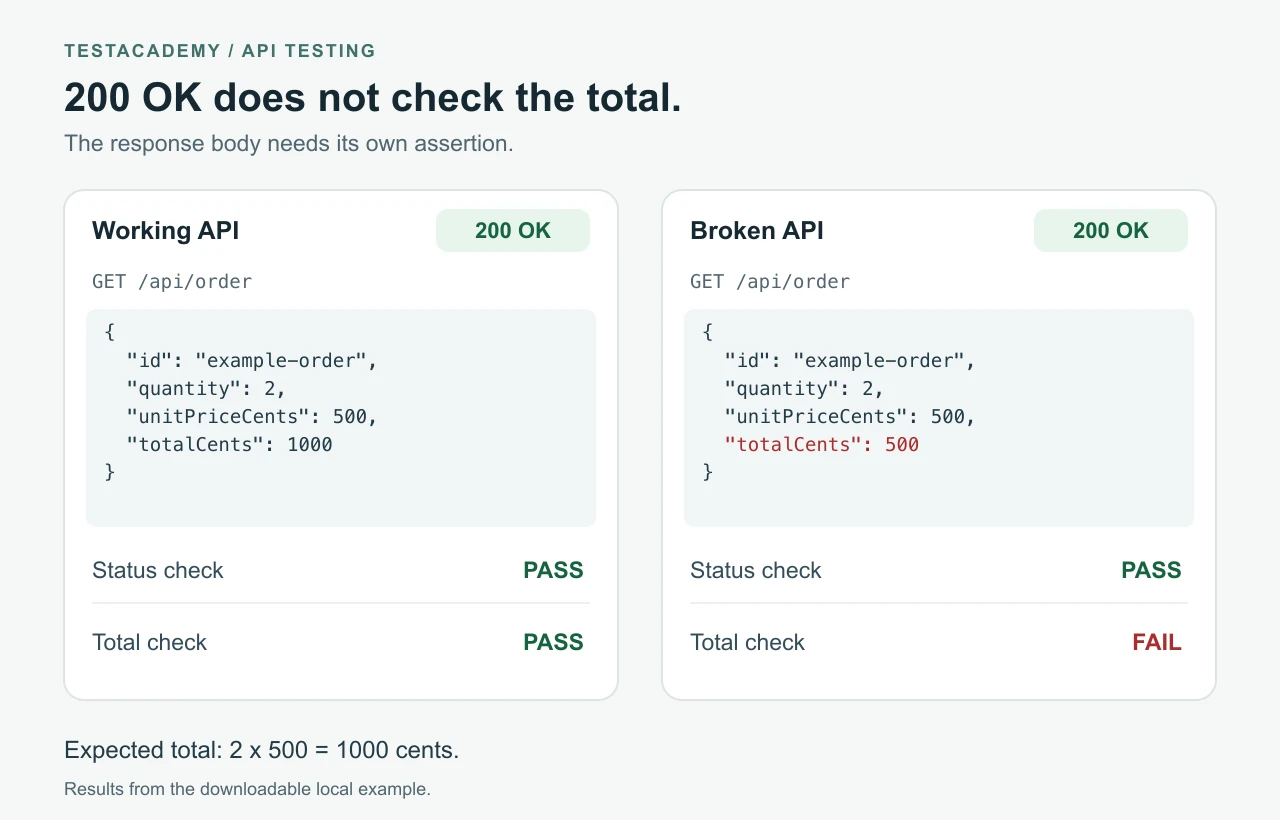
The test that misses the error
The examples use Node.js, which runs JavaScript outside a browser. Its built-in test runner collects and runs the tests. No extra packages are needed for this example. The same checks apply in Playwright and other API testing tools.
This is the complete file named status-only.test.mjs:
import test from 'node:test';
import assert from 'node:assert/strict';

test('order request succeeds', async () => {
  const response = await fetch('http://127.0.0.1:3007/api/order');
  assert.equal(response.status, 200);
});
The imports load Node's test and assertion tools. test gives the check a name. fetch sends a GET request. GET asks the API for data. await waits for the response. assert.equal compares the returned status with 200.
The test never reads the order total. It passes on the working version. It also passes on the broken version.
Add an assertion for the response body
The next test keeps the status check. It also checks the required total. Save it as total.test.mjs:
import test from 'node:test';
import assert from 'node:assert/strict';

test('order total includes both items', async () => {
  const response = await fetch('http://127.0.0.1:3007/api/order');
  assert.equal(response.status, 200);

  const order = await response.json();
  assert.equal(order.totalCents, 1000, 'The total must include both items.');
});
response.json() reads the JSON data. We can then read totalCents from it. The assertion compares that value with 1000. The message explains what the total must include.
Set the expected total from the requirement. Here, the requirement is two items at 500 cents each.
On the broken API, the assertion fails with this message:
The total must include both items.

500 !== 1000
The returned total is 500 cents. The required total is 1000 cents. Check the calculation that combines quantity and unit price.
Results from running both checks
| API version | HTTP status | Status check | Total check |
|---|---|---|---|
| Working calculation | 200 | Pass | Pass |
| Broken calculation | 200 | Pass | Fail |
These results come from running the downloadable example. The total check detects the specific calculation error. Other requirements need their own checks.
Try it on your computer
You need Node.js 22 or newer. Check your installed version with node --version.
Download the example files and extract them. Open a terminal in the extracted folder. A terminal is the app where you enter commands. These files run locally, outside the TestAcademy browser editor.
Start the working API.
node server.mjs
Keep that terminal open. Open another terminal in the same folder. Run the checks:
node --test status-only.test.mjs
node --test total.test.mjs
Both tests pass. Each command runs the test file named after --test.
Start the broken API. Return to the first terminal. Press Ctrl+C to stop the server. Then start it with the broken calculation:
node server.mjs --broken
Return to the second terminal. Run the same test commands again. The status check passes. The total check fails. Stop the server with Ctrl+C when you finish.
If port 3007 is already in use, the server cannot start. Stop the app using that port, or change it in all three JavaScript files. The port is the number after 127.0.0.1: in the local address.
Use this when reviewing API tests
Keep the status check. Add checks for values that prove the expected behaviour. For an order, that can include its identity, quantity and total. Choose checks from the requirements for that API.
The same mistake happens in browser tests. A test can pass and still miss a bug shows a button example.
Remember this
A 200 OK response does not prove the returned values are correct. Check the response body against a known requirement.
References: Node.js test runner and Node.js assertions.